
Skip to content
  • About
  • Home
  • Android APP
  • Linux
  • Windows
  • Contact
  • About

AhmedShimi

Computer World

Written by ahmed shimiJanuary 14, 2017

How to Enable and Play a Login Sound in Ubuntu 16.04

play login sound

Ubuntu 16.04 does not play a startup / login sound in my laptop, but it’s easy to play a sound at login and customize the sound file by adding a new startup program using Startup Applications utility.

And below steps will show you how:

1. Launch Startup Applications utility from the Dash.
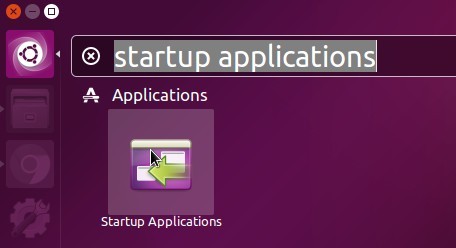
launch-startup-applications

2. When it opens, click Add to add a new startup program and:

  • Type any word in Name and Comment boxes.
  • For the Command box, paste below line to play the default Gnome login sound:
    /usr/bin/canberra-gtk-play --id="desktop-login" --description="GNOME Login"
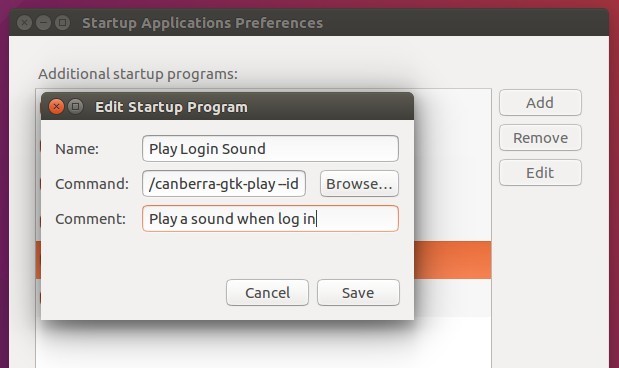
Play Login Sound

3. To play any other .ogg, .oga, or .wav sound at login, you can use paplay command in the Command box.

For example:

paplay /home/handbook/Audio/linux-startup.ogg
paplay /usr/share/sounds/purple/login.wav
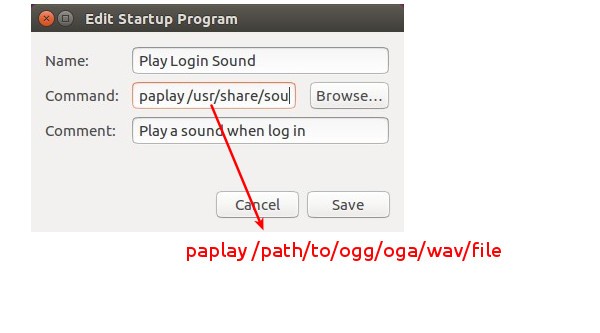
play custom sound at login

After saved the changes, you’ll hear the sound at next login.

Share this:

  • Click to share on X (Opens in new window) X
  • Click to share on Facebook (Opens in new window) Facebook
Like Loading...

Related

Posted in Linux, Uncategorized.Tagged Play a Login Sound, Ubuntu 16.04.

Leave a comment Cancel reply

Post navigation

Previous Post 13 Linux Network Configuration and Troubleshooting Commands
Next Post How To Install The Latest GIMP 2.9 Development Build on Ubuntu
Create a website or blog at WordPress.com
  • Comment
  • Reblog
  • Subscribe Subscribed
    • AhmedShimi
    • Already have a WordPress.com account? Log in now.
    • AhmedShimi
    • Subscribe Subscribed
    • Sign up
    • Log in
    • Copy shortlink
    • Report this content
    • View post in Reader
    • Manage subscriptions
    • Collapse this bar
 

Loading Comments...
 

    %d
      Design a site like this with WordPress.com
      Get started