
Most of educational institutions are still using some MS Fonts. I am not sure about other regions. But in Tamilnadu (An Indian state), Times New Roman and Arial fonts are being mostly used by almost all sort of documentation works, projects, thesis, and assignments in colleges and schools. Not only the educational institutions, some small organizations, offices, and shops are using MS Fonts too.
In case you are in a situation that you have to install Microsoft fonts in your Ubuntu Linux desktop, here is how to do it.
Disclaimer: Microsoft has released its core fonts for free. But Please be mindful that usage of Microsoft fonts outside running Windows system is prohibited by Microsoft’s End User License Agreement. Read the EULA carefully before installing MS Fonts in any Linux operating system. Neither OSTechNix or me is not responsible for any kind of piracy act.
Install MS Fonts in Ubuntu 16.04 LTS desktop
Install MS TrueType Fonts as shown below:
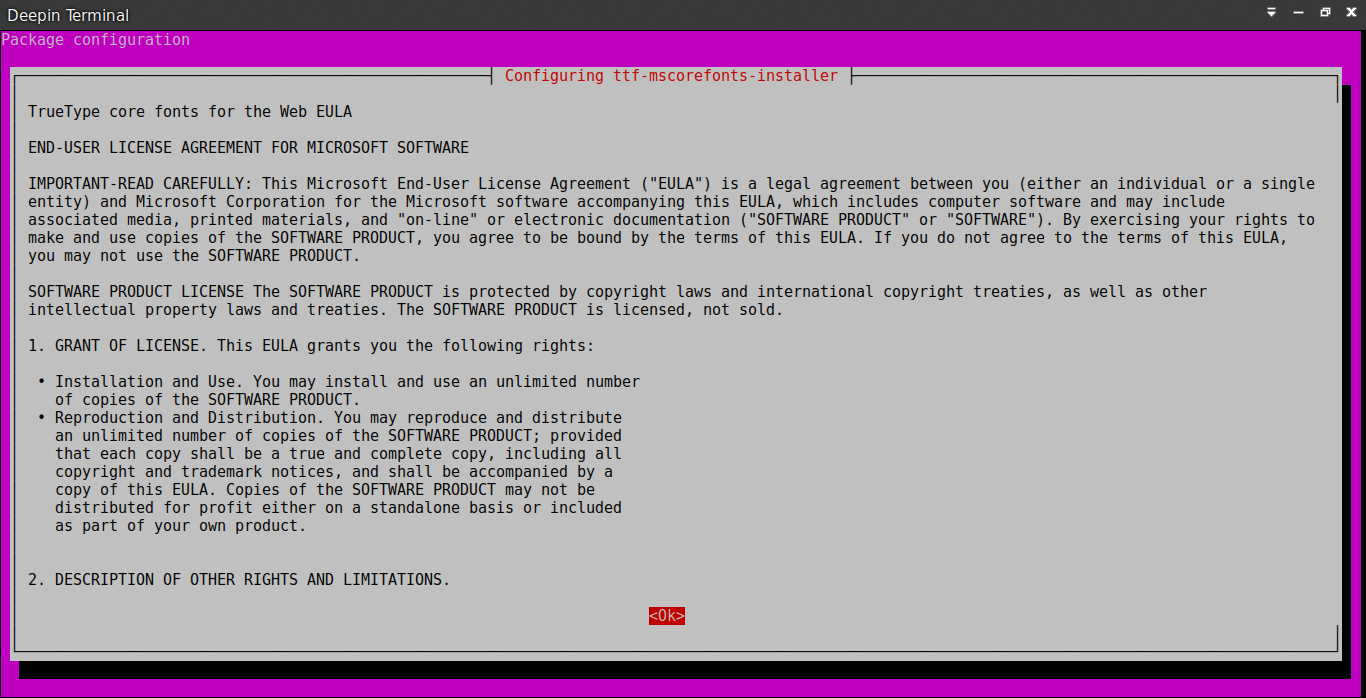
sudo apt-get updatesudo apt-get install ttf-mscorefonts-installerMicrosoft’s End user agreement wizard will appear.
Click Ok to continue.
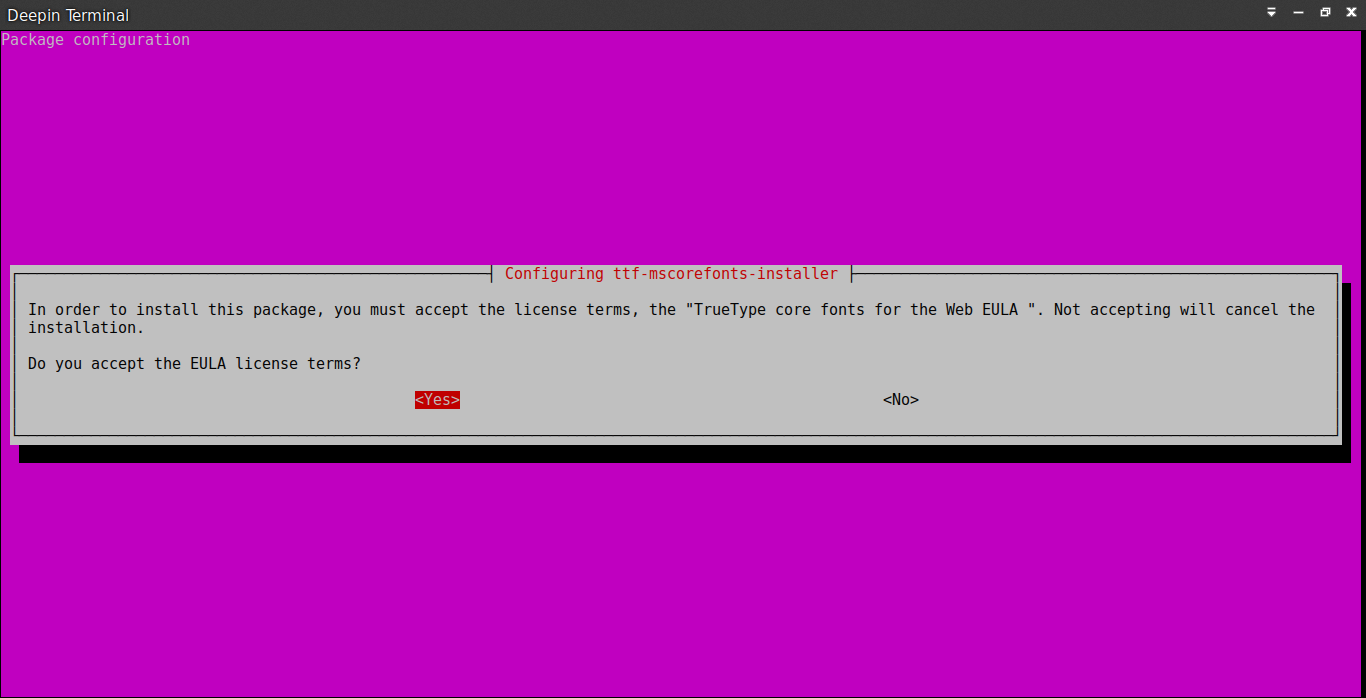
Click Yes to accept the Microsoft agreement:
After installing the fonts, we need to update the font cache using command:
sudo fc-cache -f -vSample output:
/usr/share/fonts: caching, new cache contents: 0 fonts, 5 dirs
/usr/share/fonts/X11: caching, new cache contents: 0 fonts, 4 dirs
/usr/share/fonts/X11/Type1: caching, new cache contents: 8 fonts, 0 dirs
/usr/share/fonts/X11/encodings: caching, new cache contents: 0 fonts, 1 dirs
/usr/share/fonts/X11/encodings/large: caching, new cache contents: 0 fonts, 0 dirs
/usr/share/fonts/X11/misc: caching, new cache contents: 59 fonts, 0 dirs
/usr/share/fonts/X11/util: caching, new cache contents: 0 fonts, 0 dirs
/usr/share/fonts/cmap: caching, new cache contents: 0 fonts, 5 dirs
/usr/share/fonts/cmap/adobe-cns1: caching, new cache contents: 0 fonts, 0 dirs
/usr/share/fonts/cmap/adobe-gb1: caching, new cache contents: 0 fonts, 0 dirs
/usr/share/fonts/cmap/adobe-japan1: caching, new cache contents: 0 fonts, 0 dirs
/usr/share/fonts/cmap/adobe-japan2: caching, new cache contents: 0 fonts, 0 dirs
/usr/share/fonts/cmap/adobe-korea1: caching, new cache contents: 0 fonts, 0 dirs
/usr/share/fonts/opentype: caching, new cache contents: 0 fonts, 3 dirs
/usr/share/fonts/opentype/noto: caching, new cache contents: 36 fonts, 0 dirs
/usr/share/fonts/opentype/stix: caching, new cache contents: 29 fonts, 0 dirs
/usr/share/fonts/opentype/stix-word: caching, new cache contents: 5 fonts, 0 dirs
/usr/share/fonts/truetype: caching, new cache contents: 1 fonts, 20 dirs
/usr/share/fonts/truetype/abyssinica: caching, new cache contents: 1 fonts, 0 dirs
/usr/share/fonts/truetype/ancient-scripts: caching, new cache contents: 1 fonts, 0 dirs
/usr/share/fonts/truetype/dejavu: caching, new cache contents: 6 fonts, 0 dirs
/usr/share/fonts/truetype/fonts-guru-extra: caching, new cache contents: 1 fonts, 0 dirs
/usr/share/fonts/truetype/freefont: caching, new cache contents: 12 fonts, 0 dirs
/usr/share/fonts/truetype/kacst: caching, new cache contents: 15 fonts, 0 dirs
/usr/share/fonts/truetype/kacst-one: caching, new cache contents: 2 fonts, 0 dirs
/usr/share/fonts/truetype/lao: caching, new cache contents: 1 fonts, 0 dirs
/usr/share/fonts/truetype/liberation: caching, new cache contents: 16 fonts, 0 dirs
/usr/share/fonts/truetype/lohit-punjabi: caching, new cache contents: 1 fonts, 0 dirs
/usr/share/fonts/truetype/msttcorefonts: caching, new cache contents: 58 fonts, 0 dirs
/usr/share/fonts/truetype/nanum: caching, new cache contents: 6 fonts, 0 dirs
/usr/share/fonts/truetype/openoffice: caching, new cache contents: 1 fonts, 0 dirs
/usr/share/fonts/truetype/padauk: caching, new cache contents: 4 fonts, 0 dirs
/usr/share/fonts/truetype/sinhala: caching, new cache contents: 1 fonts, 0 dirs
/usr/share/fonts/truetype/takao-gothic: caching, new cache contents: 1 fonts, 0 dirs
/usr/share/fonts/truetype/tibetan-machine: caching, new cache contents: 1 fonts, 0 dirs
/usr/share/fonts/truetype/tlwg: caching, new cache contents: 58 fonts, 0 dirs
/usr/share/fonts/truetype/ttf-khmeros-core: caching, new cache contents: 2 fonts, 0 dirs
/usr/share/fonts/truetype/ubuntu-font-family: caching, new cache contents: 13 fonts, 0 dirs
/usr/share/fonts/type1: caching, new cache contents: 0 fonts, 1 dirs
/usr/share/fonts/type1/gsfonts: caching, new cache contents: 35 fonts, 0 dirs
/usr/local/share/fonts: caching, new cache contents: 0 fonts, 0 dirs
/home/ostechnix/.local/share/fonts: skipping, no such directory
/home/ostechnix/.fonts: skipping, no such directory
Re-scanning /usr/share/fonts: caching, new cache contents: 0 fonts, 5 dirs
Re-scanning /usr/share/fonts/X11: caching, new cache contents: 0 fonts, 4 dirs
Re-scanning /usr/share/fonts/X11/encodings: caching, new cache contents: 0 fonts, 1 dirs
Re-scanning /usr/share/fonts/cmap: caching, new cache contents: 0 fonts, 5 dirs
Re-scanning /usr/share/fonts/opentype: caching, new cache contents: 0 fonts, 3 dirs
Re-scanning /usr/share/fonts/truetype: caching, new cache contents: 1 fonts, 20 dirs
Re-scanning /usr/share/fonts/type1: caching, new cache contents: 0 fonts, 1 dirs
/var/cache/fontconfig: cleaning cache directory
/home/ostechnix/.cache/fontconfig: cleaning cache directory
/home/ostechnix/.fontconfig: not cleaning non-existent cache directory
fc-cache: succeeded
ostechnix@ostechnix:~$
 AhmedShimi