
I often get Emails from users how to become master at Linux command-line. My reply is, and always will be, stop using GUI mode. Learn how to do stuffs from Terminal. Ask any Linux expert, and they will always say – “Command line mode is more powerful and easy”. I fully concur with this statement. In case, you don’t know how to do a specific task from command line, just google your question and start from there. Linux command line is not that difficult as you think. However, some users are not so interested to use CLI mode no matter how hard you try to persuade them. They always prefer to use GUI mode only. If you’re one of them, meet “Betty”, a command-line virtual assistant for Linux.
Betty is somewhat similar to Apple’s Siri personal assistant or Google Voice Search feature. It is a friendly English-like interface for your command line that translates English-like phrases into Linux commands. You don’t need to google your question or don’t even need to refer the man pages. Just ask your questions in simple English sentences, and Betty will instantly do what you just said. In this brief tutorial, I will show you how to install and use Betty in Linux.
Betty – The Siri-like Commandline Virtual Assistant For Linux
Install Betty
First, Install the necessary prerequisites.
On Arch Linux and derivatives:
sudo pacman -S git curl rubyOn Debian based systems:
sudo apt-get install git curl rubyOn RPM based systems:
sudo yum install git curl rubyOn SUSE, openSUSE:
sudo zypper install git curl rubyThen, git clone the Betty repository using the following command:
git clone https://github.com/pickhardt/bettyI have cloned Betty repository in my $HOME directory.
Add the betty alias in .bashrc file.
To do so, edit .bashrc file:
vi ~/.bashrcAdd the following line at the end:
alias betty="/home/sk/betty/main.rb"Replace /home/sk/betty/ path with your own. Since I have cloned the betty repository in my HOME directory, I have added the above path.
Finally, update the changes made in your bashrc file using the following command:
source ~/.bashrcRecommended Download – Free Cheat Sheet: “Linux Command Line Cheat Sheet”Betty Usage
Betty usage is trivial. Allow me show you some practical examples.
Let us say, you want to find your username.
To do so, you would type:
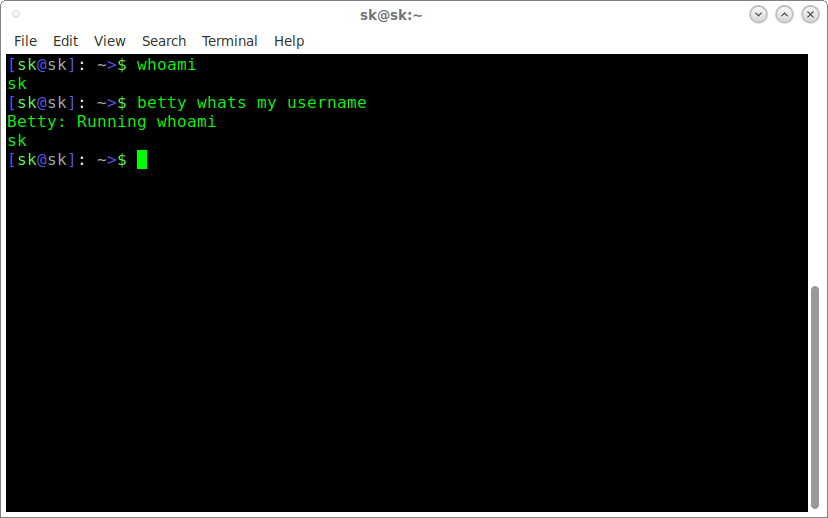
whoamiHowever, you don’t need to run the actual command. You don’t have to memorize and remember all Linux commands any more. Just ask the Betty in plain English phrases.
Say for example, to know your username, just type:
betty whats my usernameSample output would be:
Betty: Running whoami
sk
Cool, isn’t? Betty is smart enough to understand your question and It will execute the command “whoami” and display the result.
Here are more examples.
$ betty whats my kernel version
Betty: Running uname -a
Linux sk 4.11.9-1-ARCH #1 SMP PREEMPT Wed Jul 5 18:23:08 CEST 2017 x86_64 GNU/Linux
$ betty what time is it Betty: Running date +"%r (%T)" 06:59:17 PM (18:59:17)$ betty what month is it Betty: Running date +%B AugustIf there’s more than one way Betty could respond, she’ll ask you to select the one you want. Have a look at the following example. I have asked her the IP address of my system. She asked me back – Internal Ip or External IP. I wanted her to display my internal IP, so I entered 1 (number one). She ran “ifconfig” command and displayed the IP address.
$ betty whats my ip address
Betty: Okay, I have multiple ways to respond.
Betty: Enter the number of the command you want me to run, or N (no) if you don't want me to run any.
[1] ifconfig
 Gets your internal ip address.
[2] curl -sL http://pannous.net/ip.php
 Gets your external ip address.
1
Betty: Running ifconfig
lo: flags=73<UP,LOOPBACK,RUNNING> mtu 65536
 inet 127.0.0.1 netmask 255.0.0.0
 inet6 ::1 prefixlen 128 scopeid 0x10<host>
 loop txqueuelen 1000 (Local Loopback)
 RX packets 0 bytes 0 (0.0 B)
 RX errors 0 dropped 0 overruns 0 frame 0
 TX packets 0 bytes 0 (0.0 B)
 TX errors 0 dropped 0 overruns 0 carrier 0 collisions 0

wlp9s0: flags=4163<UP,BROADCAST,RUNNING,MULTICAST> mtu 1500
 inet 192.168.43.192 netmask 255.255.255.0 broadcast 192.168.43.255
 inet6 fe80::c218:85ff:fe50:474f prefixlen 64 scopeid 0x20<link>
 ether a0:38:73:10:99:5h txqueuelen 1000 (Ethernet)
 RX packets 102938 bytes 101205525 (96.5 MiB)
 RX errors 0 dropped 0 overruns 0 frame 0
 TX packets 75264 bytes 12390762 (11.8 MiB)
 TX errors 0 dropped 0 overruns 0 carrier 0 collisions 0
If Betty can’t understand your question, she will display the following message:
Betty: I don't understand. Hopefully someone will make a pull request so that one day I will understand.For more examples, see Betty GitHub project page.
Don’t think Betty will do all complex things, like deploying a Web server. You can use it to perform some simple commands. If you want to add more features, send a pull request and contribute to the project in GitHub (Link is provided below).
Even though Betty is not being actively maintained, it’s still fully functional. If you’re too lazy to learn Linux commands, Betty might be a perfect companion for you. Give it a try, you won’t be disappointed.
Cheers!
Resource:

Source: Betty – The Siri-like Commandline Virtual Assistant For Linux – OSTechNix
 AhmedShimi