
NetSpeed displays current internet activity in the GNOME panel for a specific network device (e.g., your Wi-Fi).
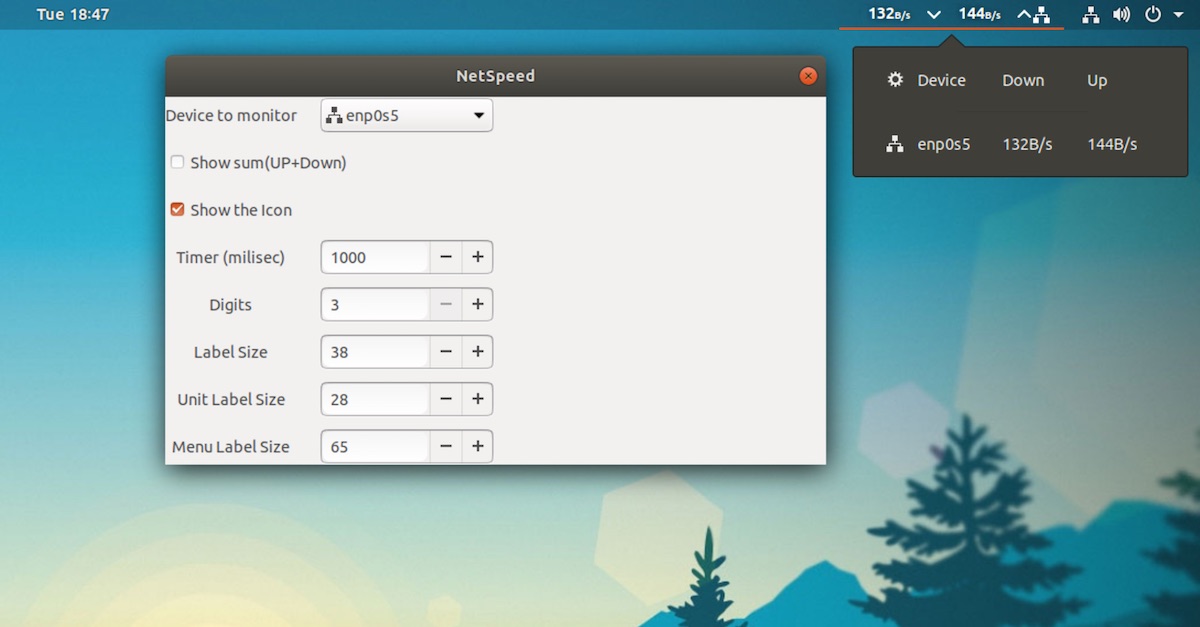
To see information (well, slightly more information) about other network interfaces you can click on the menu bar item. It lists all active network devices so that you can see which device traffic is currently active through.
A small set of options accompany the utility:

Display network traffic in the GNOME Top Bar
You can access the settings dialog by clicking the ‘cog’ icon in the pop-over menu.
As well as choosing which device to monitor by default you can opt to see a combined sum of upload and download traffic; hide or display the network icon in the top bar, and tweak the appearance.
Not an advanced solution, of course
If you’re wanting to see detailed information about network traffic you need to use a more advanced CLI tool, like iptraf, speedometer or ifstat (all available from the archives).
Using Unity?
If you’re not using GNOME Shell you can still display network speeds in the panel by installing an indicator applet like Indicator NetSpeed.
Install NetSpeed on Ubuntu
But for casual, at-a-glance use, the NetSpeed GNOME extension ticks all the boxes it needs to. You can install the latest release from the GNOME Extensions website at the link below. Just slide the toggle from ‘off’ to ‘on’ to prompt installation.
Source: Display Network Traffic in the Ubuntu Panel with NetSpeed – OMG! Ubuntu!
 AhmedShimi